I forgot, that I once started this timer as a test:
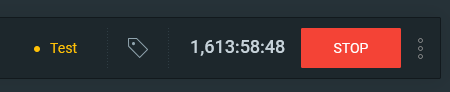
Too bad I cannot stop the timer anymore:


Also, really dislike the 30 API requests / hour change for the free tier, especially that none of the developers were informed about this ahead of time.
I forgot, that I once started this timer as a test:
Too bad I cannot stop the timer anymore:
Also, really dislike the 30 API requests / hour change for the free tier, especially that none of the developers were informed about this ahead of time.
Hi there, thank you for reaching out to us and for the screenshot! I see that you have a timer which exceeded the max duration of a single time entry (999 hours)
In this case, you may ‘discard’ that time entry by clicking on the 3 dots beside the [Stop] button, then selecting the [Discard] option to stop it.
Lastly, thank you for sharing your feedback about the recent api limit update. We strived to inform users about this change on this article.
We hope this helps! If anything else comes up, feel free to reach out to us directly at support@clockify.me and we’ll be there to help! Cheers!
The three-dot discard tip is worth remembering for anyone who leaves a test timer running past 999 hours. On the API limit, I agree that an article link doesn’t replace a heads-up before the change took effect. Surfacing the hourly request count in the app would help, though a usage indicator developers can check mid-integration seems especially useful. Without that visibility, discovering the cap during a build is frustrating.
The three-dot discard is a good catch for a stuck timer, though it would be even better if Clockify simply prevented the 999-hour overflow in the first place. On the API side, I agree that a usage indicator inside the app matters more than a documentation page someone reads after hitting the cap. Developers building integrations need to see their hourly request count before a limit changes, not discover it mid-build. A heads-up plus in-app visibility would save a lot of frustration on both fronts.
Hi everyone, thank you for the kind feedback and for sharing your thoughts about the 999-hour timer, API change, and limits. I can see how having an in-app indicator on the current API usage and limits can be really helpful for some workflows, while we cannot make any promises at the moment, we have forwarded this to our team as a feature improvement request for their consideration. Cheers!
You do realize that those are just spam accounts? Sadly the forum has not reporting function, but these accounts and their messages should be deleted.
Thank you for sharing @eXpl0it3r!
I have escalated it on to my team and we have successfully suspended the spam accounts.
While we cannot make any promises for now, I have also forwarded the request for the reporting function for Forums for the team’s consideration, thank you again for the feedback!