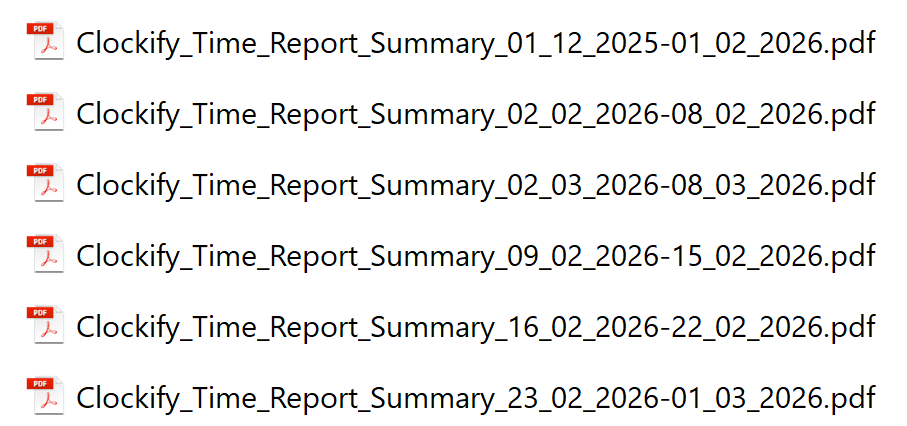
At some point in the last couple months, the naming in report exports was updated such that it went away from the YYYY-MM-DD format to DD-MM-YYYY. This has made the interpretation and ordering of reports in folders far more difficult. Can you please look into returning to the old date formatting as the default on report exports?
As an example, I share the following which was a recent group of reports we exported for a project. These are sorted by name (within Windows). The first report spans Dec to Jan. The second report is the 1st week of Feb. The third on the list is the 1st week of March. Then the rest of Feb follows in sequence. We can obviously create workarounds (renaming, subfolders, etc) but just adds extra work.
Thank you for this report and for the screenshot highlighting this case.
I can share that my team is already aware of this limitation and they are currently working on the improvement so the filename matches the date format set in your preference settings
Once we receive an update on the case, we’ll add it here, or you can also reach out to us at support@clockify.me, so we can also update you directly via email.
My team has released the fix and the exported file name on reports should now match your profile’s preference settings (Profile icon, upper right > Preference > Date format)
Please test it out and let us know if it is now working as intended! Cheers!