In the summary report, if you have multiple groups enabled, it isn’t possibl eto click a grouped item to go to the detail report with just that grouping visible.
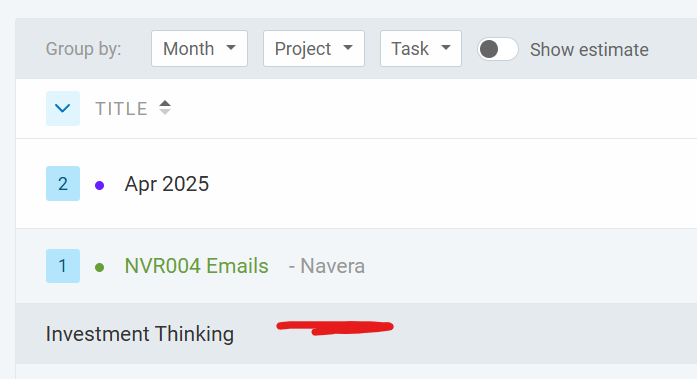
E.g. this view is grouped by Month > Project > Task
At the lowest level, “Investment Thinking” is a task that is reported here under a project, within a Month.
Clicking “Investment Thinking” will take you to the detail report for that Task but NOT filtered by that month or that project. In other words the nested groups aren’t respected as you drill into these groupings to understand the time entries behind them.
Often I need to look at my data with these groupings, then make a bulk edit to the time entries that form those groups. This is really difficult when you can’t jump to the detail report from within a group and retain the view of just the time entries that formed that group.
Thank you for the report! I see what you mean. In the current design, clicking on a grouped field (on the Summary report) will route you to the detailed report filtered only through that specific field (such as your example on task) regardless of the categorization above it (such as Month, and Project)
The date filter (or calendar picker) will also currently depend on the initial date filter selected during the Summary report.
However, I can see how having the filters (when redirected to the detailed report) updating to the selected grouping in the Summary report can be a neat improvement.
Although we cannot promise anything or an ETA, I’ll make sure to pass this on to my team as a feature suggestion so they can have it in mind when looking for features to improve. Thank you for this feedback!